

Resume Help After 50: What's Worth Paying For (and What Isn't)
Laid off after 50 and staring at an outdated resume? Here’s what to fix yourself for free, which kinds of paid help are worth it, real prices, and the red flags to avoid.
When I was laid off at 55, I opened my resume for the first time in years and froze. The format looked dated. The dates gave away my age. And every ad on my screen promised a “guaranteed” new job if I’d just pay $299.
As tempting as it was to pay someone to fix it, I decided to try it myself first. I also passed it to a few younger friends, asked for their honest feedback, and updated it from there.
I’m still in it. I’m working through these same steps until my resume feels right. If you’re there too, here’s what I’ve learned so far: what you can fix yourself for free, which kinds of paid help actually make sense after 50, and the red flags that should make you close the tab.
Start with the free fixes
Before you spend a dollar, do these five things. They take an afternoon and solve most of the "my resume looks old" problem.
Cut it to the last 15 years. Hiring managers care about recent work. Older roles can go in a short "Earlier experience" line with no dates.
Remove graduation years. Keep the degree and school. The year adds nothing except your age.
Drop the objective statement. Replace it with a 3-line summary of what you do best and the results you've delivered.
Modernize the basics. One clean font, a LinkedIn URL, a professional email address, and no street address (city and state is enough).
Use free local help. Your public library and your state's unemployment or career center often offer free resume reviews and workshops. Call and ask.
Ask someone younger to read it. They’ll spot what looks outdated in seconds. Mine did.
If your resume still isn't getting responses after this, that's when paid help can make sense.
The three kinds of paid resume help (and who each is for)
Not all resume help is the same product. Pick the type that matches your actual problem, not the one with the loudest ad.
1. Do-it-yourself resume builders
Best for: You write well and know what you've accomplished, but your format looks like 2009.
These are online tools with modern templates. You type in your experience and they handle the layout. Some are free to use, like Career.io. Others charge a monthly subscription.
Options to look at: Career.io, MyPerfectResume
Watch for: Low trial prices that auto-renew monthly. Download your resume, then cancel if you don't need ongoing access.
2. Resume checkers for screening software
Best for: You're applying to lots of jobs and hearing nothing back.
Many employers run resumes through software before a person ever sees them. A checker compares your resume to a specific job posting and shows which keywords and skills are missing.
Option to look at: Jobscan
Tip: Use the free scans first to see whether keywords are really your problem before you pay.
3. Professional resume writers
Best for: You're changing fields, condensing a long career, or you simply hate writing about yourself.
A real writer interviews you or reviews your history and builds the resume for you. This is the most expensive option, but it can be worth it if you've been stuck for months.
Options to look at: TopResume, ZipJob
Ask before you buy: How many revisions are included? Do they write a cover letter and LinkedIn profile too, or is that extra?
Quick comparison
Free fixes: $0
Best for: Everyone. Start here.
Options: Your library, your state career center
DIY resume builder: Free, or $2.95 trial
Best for: A dated format, but you write well
Options: Career.io (free), MyPerfectResume ($2.95 for 14 days, then $23.95 every 4 weeks unless you cancel)
Screening software checker: A few free scans, then $49.95/month
Best for: Lots of applications, no replies
Options: Jobscan
Professional resume writer: About $139–$349 (one-time)
Best for: Career changes, long histories, or being stuck for months
Options: ZipJob (starts around $139), TopResume (starts around $179)
Tip: Higher packages add a cover letter and LinkedIn update. Decide what you actually need before you click “upgrade.”
Red flags before you pay anyone
When you're scared about money, it's easy to get sold. Close the tab if you see any of these:
Guarantees with no clear refund terms. Read exactly what happens if it doesn’t work.
Pressure to upgrade. A $99 package that turns into $400 at checkout.
No samples or real reviews. A legitimate writer can show you before-and-after examples.
Auto-renewing subscriptions. Read the fine print before entering your card. Set a calendar reminder to cancel.
Upfront payment with no revision policy. You should get at least one round of changes.
A resume is only one piece
A layoff after 50 isn't just a job search. It's severance, health insurance, a budget that suddenly has to stretch, and a dozen deadlines at once.
That’s why I made the 50+ Layoff Financial & Job Search Toolkit, a simple Excel workbook for tracking your budget, applications, and next steps in one place. I built it while going through this myself. It’s the organizer I wish I’d had my first week.
Frequently asked questions
Is a professional resume writer worth it after 50? It can if you're changing careers, condensing 25+ years, or you've applied for months with no responses. If your only problem is an old format, a DIY builder costs far less.
How far back should my resume go? About 15 years in detail. Anything older can be summarized in one line without dates.
Should I hide my age on a resume? You don't need to hide it, but you don't need to advertise it either. Remove graduation years and very old roles, and focus on recent results and current skills.
You've done harder things than this
We're the generation that let ourselves in after school and figured it out. A resume is just one more thing to figure out, and you don't have to overspend to do it. Want more practical help for Gen X navigating work, money, and what's next? Join the Latchkey Vibes list.
The Totally Rad 80s & 90s Party Guide
Disclosure: This post contains affiliate links. If you buy through them, Latchkey Vibes may earn a small commission at no extra cost to you. As an Amazon Associate I earn from qualifying purchases.
We grew up with mixtapes, MTV and a house key on a shoelace. Now we're the ones throwing the parties. Whether it's a 50th birthday, a reunion or New Year's Eve, an 80s and 90s party is the easiest theme there is: everyone already knows the music, the snacks and the outfits.
This guide covers everything you need, from neon decor to a playlist that will get your friends singing into a hairbrush again. Pick a decade, or do what we do and mash them together.
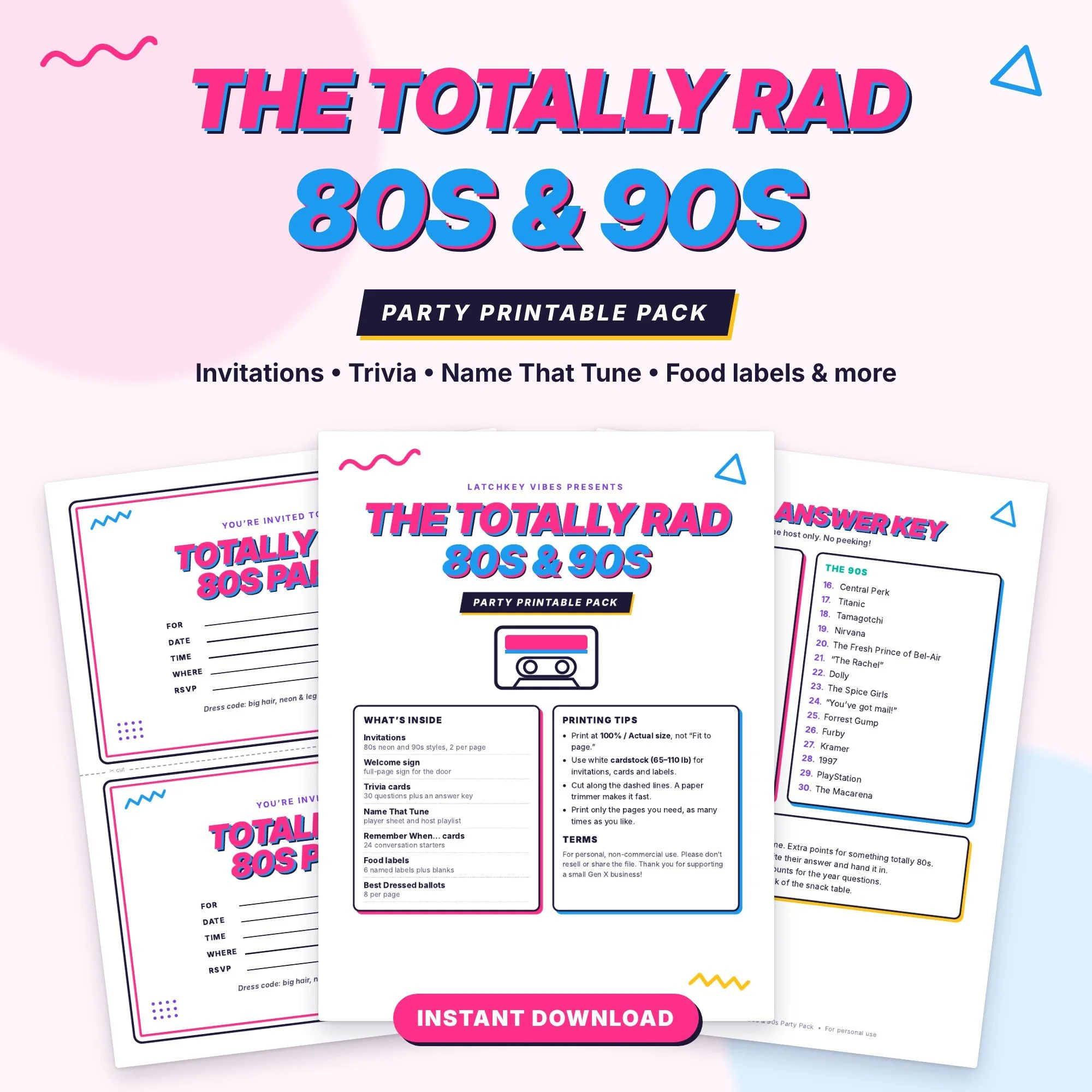
Skip the Planning: Grab the Party Pack
Want the fun stuff done for you? The Totally Rad 80s & 90s Party Printable Pack has everything you can print at home tonight:
Fill-in invitations (80s neon and 90s grunge versions)
80s & 90s trivia cards with answer key
"Name That Tune" game sheets
"Remember When..." conversation cards
Food labels and a welcome sign
Not ready for the full pack? Get 10 free trivia cards when you join our mailing list below ↓
Decor: Make It Look Like 1987 Threw Up (in a Good Way)
Start with color. Neon pink, electric blue and lime green read "80s" from across the room. For the 90s, add black, plaid and a little smiley-face yellow.
Neon party decorations kit. Banners, balloons and hanging swirls in one box, the fastest way to set the mood. [Shop on Amazon]
Cassette tape and boombox cutouts. Tape them to walls or use them as table centerpieces. [Shop on Amazon]
Inflatable boombox or giant cell phone. A photo-booth prop guests can't resist. [Shop on Amazon]
Black light and UV glow tablecloths. Turn down the lights and everything neon pops. [Shop on Amazon]
Tip: Dig out your own old yearbooks, concert T-shirts and VHS tapes. Real artifacts beat store-bought every time, and they start conversations.
Outfits: Dress Like Your Yearbook Photo
No one needs a full costume. One or two accessories do the job, and they're the easiest thing to set out in a basket for guests who "forgot."
80s
Neon accessory set. Leg warmers, fishnet gloves, tutu and big earrings in one pack. [Shop on Amazon]
Scrunchie multipack. Wear one, share the rest. [Shop on Amazon]
Slap bracelets. Yes, they still make them. [Shop on Amazon]
90s
Butterfly hair clips. A whole pack costs less than a latte. [Shop on Amazon]
Choker necklaces (tattoo style). The stretchy kind you'll remember. [Shop on Amazon]
Plaid Shirt. Works for men and women alike. [Shop on Amazon]
Snacks and Drinks: The After-School Spread
Recreate the snack cabinet you raided after school. Set it all out in bowls with printed labels and watch grown adults fight over the Pop Rocks.
Retro candy box. Pop Rocks, Big League Chew, Candy Cigarettes (now "candy sticks"), Fun Dip and Ring Pops.
Fruit by the Foot and Gushers. The lunchbox trade currency.
Capri Sun or Hi-C juice boxes. For the kids, and the adults who want a flashback.
Bagel Bites and pizza rolls. Grab these at the grocery store and keep the oven busy.
Jell-O shots in neon colors. The grown-up version of the school cafeteria.
Classic cocktails. Fuzzy navels, wine coolers and a pitcher of Zima-style spritzers for the brave.
Tip: Serve snacks in a vintage-style metal lunchbox or a TV tray. It's the small details people photograph.
Games and Activities: Keep the Party Rolling
The best 80s and 90s parties have something to do. Pick two or three of these.
80s & 90s trivia. Split into teams and see who really paid attention to MTV. Trivia cards are in the [Party Pack].
Name That Tune. Play 10 seconds of a song and race to shout the title. Game sheets are in the [Party Pack].
Retro game console. A plug-and-play mini console with Pac-Man, Galaga or Super Mario hooks right into the TV. [Shop on Amazon]
Karaoke machine with Bluetooth. Nothing beats a room full of 50-somethings belting "Livin' on a Prayer." [Shop on Amazon]
Twister. Still the great equalizer, though maybe stretch first. [Shop on Amazon]
Polaroid-style instant camera. Guests take a snap, pin it to a "Then & Now" board. [Shop on Amazon]
Best Dressed vote. Hand out a cheap trophy or crown at the end of the night. [Shop on Amazon]
The Playlist: Press Play on the Mixtape
Start with 80s pop while people arrive, then slide into 90s hits once the dancing starts. A starter list:
80s
"Take On Me" – a-ha
"Girls Just Want to Have Fun" – Cyndi Lauper
"Livin' on a Prayer" – Bon Jovi
"Don't Stop Believin'" – Journey
"Billie Jean" – Michael Jackson
"Come On Eileen" – Dexys Midnight Runners
"Walking on Sunshine" – Katrina and the Waves
"Jump" – Van Halen
90s
"Smells Like Teen Spirit" – Nirvana
"Wannabe" – Spice Girls
"Gonna Make You Sweat" – C+C Music Factory
"No Scrubs" – TLC
"Ice Ice Baby" – Vanilla Ice
"Gangsta's Paradise" – Coolio
"Wonderwall" – Oasis
"...Baby One More Time" – Britney Spears
Tip: A retro-style Bluetooth boombox speaker plays your phone playlist and doubles as decor. [Shop on Amazon]
Party Favors: Send Them Home Smiling
Skip the generic goodie bag. These are cheap in bulk and guests actually keep them.
Mini Rubik's Cubes or keychains. Bulk packs run well under a dollar each. [Shop on Amazon]
Retro candy bags. Fill clear bags with Nerds, Laffy Taffy and Now and Laters. [Shop on Amazon]
Neon sunglasses. Hand them out at the door and the party photos take care of themselves. [Shop on Amazon]
Glow sticks and glow bracelets. Perfect for a New Year's Eve countdown. [Shop on Amazon]
Cassette-tape notebooks or stickers. A small, fun keepsake. [Shop on Amazon]
Your Party Checklist
3–4 weeks out
Pick the date and decade (or both)
Send invitations
Order decor, props and favors
1 week out
Build the playlist
Print trivia, games and food labels
Set out the dress-up accessory basket
Day of
Hang decor and set up the photo booth
Stock snacks and drinks
Press play and have a totally awesome time
Best Pillows for Better Sleep Over 50
As an Amazon Associate I earn from qualifying purchases.
If you wake up with a stiff neck, overheat at 3 a.m., or toss all night looking for a comfortable spot, your pillow may be part of the problem. Here are four options for different sleepers and budgets, with the downsides included.
Click on the pillow name below to take you to its product page :
1. DreamyBlue Signature Adjustable Shredded Memory Foam Pillow: best for adjustable support
The fill is shredded memory foam, so you can add or remove filling to get the height and firmness you want. It’s CertiPUR-US certified, which means the foam is made without certain harmful chemicals. It suits people who haven’t found the right loft in a standard pillow. One thing to know: some reviewers say the foam shifts around inside the pillow, so you may need to fluff and redistribute it from time to time.
2. Ultra Pain Relief Cooling Pillow: best for neck support
This is an ergonomic contour pillow with an adjustable cervical design, and it’s listed for side, back, and stomach sleepers. It’s worth a look if neck stiffness is your main complaint. Two things to know: a few reviewers find it a bit high, so it may not suit you if you prefer a flatter pillow. And it may have a slight odor when new.
3. QUTOOL Cooling Pillow Set of 2: best for hot sleepers
These are CertiPUR-US certified shredded memory foam pillows made for sleepers who run hot, and the set comes with two. The firmness is adjustable, which helps if you share a bed or want one for guests. One thing to know: it has an odor when first received, so give it time to air out.
4. Amazon Basics Down-Alternative Pillows (2-Pack): best budget pick
These are soft and machine washable, and they’re meant for back and stomach sleepers. If you want something simple and inexpensive, this is a good starting point.
A tip for new memory foam pillows
Memory foam can have a slight odor when new. Take the pillow out of the plastic packaging and air it out in a well-ventilated spot for about 48 hours before sleeping on it.
How to choose
Side sleepers usually need a thicker, firmer pillow to keep the neck aligned.
Back and stomach sleepers generally do better with a softer, flatter pillow.
Hot sleepers should look for cooling fills and breathable covers.
Check current prices and reviews on Amazon before you buy, since both change often.

How to Organize Your Aging Parent’s Care Information
When my father was sick, keeping his care information together helped me feel more prepared. Here are practical ways to organize your aging parent’s records, medications, appointments, and daily care notes.
When my father was sick, keeping track of his records became part of caring for him. It was a lot to hold in my head when my heart was already full of worry. Keeping everything together helped me feel a little more prepared, even when so much felt uncertain.
I know what it feels like to want to do everything you can for someone you love while trying to keep up with everyday life. You don’t need a perfect system just a place to keep the important details so you’re not searching for them when you need them most.
At the end of this article, you’ll also find the Aging Parent Care Planner I created from the system I used while caring for my father, if you’d like a little help getting started.
Here are a few things that helped me stay organized, and that I hope will make things a little easier for you, too.
1. Gather the essential contacts
Start with your parent’s doctors, pharmacy, and emergency contacts. Include names, phone numbers, and each doctor’s specialty.
With your parent’s agreement, make sure the family members helping with care know where to find this information.
2. Keep medication information together
Create a place to record medication names, current label instructions, and prescribing doctors. Include over-the-counter products and supplements when gathering information to discuss with the care team.
If you also keep a daily medication log, record what actually happened rather than relying on memory. Ask the prescriber or pharmacist about unclear instructions or missed doses.
3. Organize appointments and questions
Record upcoming appointments, locations, and questions your parent wants to ask. After each visit, add notes about follow-up tasks and the instructions provided by the care team.
For example, an appointment entry could include: “Bring the updated medication list and ask about the next follow-up visit.”
4. Keep care notes factual
A dated note can help you remember changes to discuss with a healthcare professional. Record what you observed, such as a change in appetite, sleep, or daily activities.
If the care team has asked your parent to monitor blood pressure or blood sugar, keep those readings in a consistent place. Follow their instructions about when to measure and when to contact them.
5. Coordinate with family members
When several people help with care, agree on where updates belong and who will maintain them. Include dates so everyone can identify the latest information.
Respect your parent’s preferences and privacy. Share sensitive information only with the people who need it, and keep paper and digital records secure.
Start with one small step
You don’t have to organize everything today. Start with the doctor contacts and current medication information, then add appointments and care notes as you go.
The goal is to make important details easier to find when preparing for a visit or coordinating everyday support.
Prefer a ready-made Excel organizer?
The Latchkey Vibes Aging Parent Care Planner provides an editable, reusable workbook with nine tabs for medication records, daily medication tracking, doctor and appointment information, blood pressure and blood sugar logs, observations, and emergency details.
It’s an instant digital download for use with Microsoft Excel.
See what’s included in the Aging Parent Care Planner.
This article and planner are organizational resources, not medical advice. Follow your parent’s healthcare team’s instructions for care decisions.